
Saturday, June 23, 2007


Friday, June 22, 2007
Hands-on with the HTC Touch Photos

Is this an iPhone killer? HTC seems to think so -- it claims it's as revolutionary as the mouse was to the PC. The HTC Touch runs on Windows Mobile 6 Professional and comes with a large colour touchscreen, a 2-megapixel camera and Wi-Fi connectivity.
Unlike any handset HTC has made before, the Touch features a new application called TouchFlo, which gives you access to a variety of different options via a three-dimensional interface. You swipe your finger up on the screen to activate TouchFlo and then swipe left and right to navigate through the different menu sections.
TouchFlo works well and looks great but there's a huge problem -- try clicking on any of the applications or options in it and you end up going straight back to Windows. For all its fanciness, TouchFlo is just a well-designed Windows Mobile 6 skin.
What we have isn't a revolutionary device but an attractive Windows Mobile handset. No, it's not an iPhone killer, it's not even the best Windows Mobile handset out there. There's no 3G or HSDPA connectivity and HTC only put in 64MB of RAM, so don't expect it to run smoothly all the time.
Overall, we really like the Touch's design, but we're perplexed by the specs. HTC has made some of the most cutting-edge phones out there, so why didn't it add all the things the iPhone lacks? We don't know, but HTC hinted at a new and improved version of the Touch at some point in the future.
Here's a full list of the Touch's innards for all the spec fan boys:
Dimensions: 58mm wide by 100mm tall by 14mm deepWeight: 112g
Memory: 1GB microSD storage card included / 64MB RAM, 128MB ROM
Display: 71mm (2.8-inch) LCD touchscreen with backlight, 240x320-pixel resolution with 65,536 colours
Standby time: Up to 200 hours
Talk time: Up to 5 hours
Camera: 2-megapixel
Software: Windows Mobile 6 Professional with Direct Push Email and HTML email support
Wireless connectivity: GSM/GPRS/EDGE; Tri-band: 900, 1800,1900; Wi-Fi: IEEE 802.11 b/g and Bluetooth 2.0


On the back there's a 2-megapixel camera that takes reasonable photos, but don't expect high quality shots.
*

This is the new and improved homepage that displays the time in a large, easy-to-view format. It also gives you easy access to the weather and your daily appointments, among other things.
*

This is one side of the TouchFlo interface menu system, which gives you easy access to a variety of apps. Unfortunately, once you've selected one then the cool interface disappears and you're back to Windows Mobile.
*

Via : Crave.cnet
Wednesday, June 20, 2007
PREVIEW: O2 Xda nova / HTC Touch Windows Mobile 6 Professional Smartphone
Thanks to O2 Germany and HTC Europe, I've recently received their versions of the HTC Elf. From O2 Germany I got a German Xda nova and from HTC Europe I got an English Touch. Since both devices are the latest and final hardware but neither includes all accessories nor came in the final sales-boxes, I'm not going to call it a review but preview only.
HTC caught some attraction when the Taiwanese device maker announced the HTC Touch earlier this month for some good reasons - with the HTC Touch; HTC introduced the TouchFLO technology to their Windows mobile device platform and I'm sure most of you have read everything about TouchFLO and the HTC Touch already. Nevertheless, since O2 brings up the Xda nova on sale from tomorrow, it makes sense to have a closer look on both devices again, identifying the similarities as well as the differences.
Both, the HTC Touch and the O2 Xda nova are based on HTC's Elf reference design platform and with the Elf, HTC tried to create a simple to use but stylish device to attract the consumer market better. Therefore the Touch/nova misses some of the latest but greatest technologies while on the other hand it sports new features. The HTC Elf platform is powered by Microsoft's latest Windows Mobile version - 6.0 Professional which means it's a smartphone. Both devices supports GSM/GPRS/EDGE at 90/1800/1900 MHz while 850 MHZ is left. This is pretty unusual for HTC devices, were all the latest devices quadband GSM. Nevertheless, leaving 850 MHz makes the device cheaper in production and therefore it's cheaper on sale. Also left is UMTS, not to talk about HSDPA but this isn't a big problem today - not for the segment HTC and the carriers try to target with the Touch. On the other hand, the Touch/nova features Bluetooth 2.0 and WiFi b/g which makes it a mobile broadband connected device anyway - as long as a HotSpot is in range. Powered by a TI OMAP850 CPU at 201 MHz, the Touch/nova includes 128 MB ROM and 64 MB DDR RAm and both - HTC and O2 Germany are giving a free 1 GB microSD card with their versions of the HTC Elf.
On the back, the device features a 2 megapixel CMOS fixed focus camera for photo and video recording. And at a compact size of 99.9 mm x 58 mm x 13.9 mm the HTC Touch/O2 Xda nova weights 112 g only.
While the O2 and HTC designs are pretty similar, they have their differences. For instance O2 Germany decided to give the Xda nova housing a high gloss black finishing while HTC has given the HTC Touch a soft-touch like finishing:


Another difference, as you can see from the pictures above, is the button-layout. First of all both devices are reduced to the max. They neither have soft-keys nor application shortcuts or anything else most other Windows Mobile Professional/Pocket PCs have today but all you have are the two call buttons and the D-PAD. The soft-keys are not necessary because the screen is designed to be used with the thumbs and the application keys are left in favor to give the device a simplistic design. However, O2 decided to use bigger call keys for their device while the HTC keys are pretty minimalistic as well. I like both designs and it's always a decision everybody has to make himself.
On the back there is no difference and here you have the camera as well as the loudspeaker which is used for Media Player playback, etc.:


On the left, both devices only have the volume slider (no voice notes button):


On the right you have the camera button and in the middle the flap under which the device hosts the SIM and micoSD cards:


On the bottom, both devices features the HTC typical propriety mini USB port which is used for sync and charging the device as well as connects to the stereo headset, with right to it the soft reset whole and left to it the microphone:


On the top you have the power button only:


Most impressive anyway is the used TouchFLO technology, HTC is developing for 2 years now. It might be a coincidence that the first TouchFLO devices are launched just in the moment, Apple is going to launch their iPhone as well, but HTC hadn't find a better timing anyway since so many publications wrote about it since it was announced. How is HTC's TouchFLO working? Unlike the standard touch screens as used so far for Pocket PCs, TouchFLO features a steady acrylic glass which makes the screen rocking solid. On top of this acrylic glass, HTC added a thin clear film which takes the touches and unlike standard touch screens, this film reacts on wider pressure as well. However, it supports both kind of pressures - fine stylus and thick thumb pressure which makes this technology so unique. But this allows using TouchFLO displays with both - finger thumbs and stylus.
Also different from previous touch screen is the fact, that a TouchFLO display isn't counter-sunk in the frame but flat and the touchable area isn't the screen only but the whole glass area (like on the photo bellow where the area where the O2 logo is, is also used for navigation):


With this concept, HTC had in mind to make the use of the HTC Touch as easy as possible and making the HTC Touch/Xda nova a real smartphone. Therefore HTC also developed a new Today screen plug-in and a TouchFLO optimized user interface which includes access to the most important functionalities.
The Today screen plug-in is optimized to be used with the thumb and includes a big clock, weather information (including forecast of a given city) and a launcher:


Unfortunately O2 Germany left this Today screen application out of their Xda nova but reduced the overall Today screen look and feel and uses a slightly different launcher only:

The TouchFLO optimized user interface (which is used by both - HTC and O2 Germany) is a kind of virtual cube with three pages. As soon as the thumb slide from the logo bellow the screen up to the top, the main page of the UI opens which includes shortcuts to predefined (unfortunately to customizable or changeable) applications. Unfortunately, O2 (bellow right) changed this screen a little bit and replaced the Comm Manager shortcut with a Comcenter shortcut (O2's Comcenter allows to synchronize the device over the air with the Comcenter service by using SyncML), as well as replaced Calendar and Tasks with Wecker (alarm) and Notizen (notes):


While not part of O2's TouchFLO page, both - HTC and O2 are also using a thumb-improved Comm Manager with bigger icons for their versions of the HTC Elf which makes the thumb-use of the Comm Manager easier as well:

Sliding the finger from the right to the left changes opens the media page:

While Videos and Photos opens the Microsoft Pictures and Videos application, Music opens HTC's self-developed music player interface called Audio Manager. Sitting on top of Windows Media Player Mobile, this interface provides an easier to use interface to use the device as a MP3 player:


Sliding left again opens the call and contacts page:

Here you can add 9 contacts to the quick-dial buttons as well as you can switch to the phone interface or the call history and open the contacts application. The phone interface is also reduced since it doesn't include the call start/end button anymore but here you have to use the hardware keys instead. This leaves more room for the other buttons, like the number pad:

So far so good and the new TouchFLO interface is a pleasure to use and well optimized for thumbs. However, the biggest problem is, that most other applications makes no use of this anymore not to say that all other applications are the standard Windows Mobile 6 applications which means a user has to use the stylus sooner or later again.
While it might be possible to scroll through the Inbox to pen and read a received SMS or E-Mail, latest if you want to reply you cannot use the thumbs anymore because the HTC Touch/O2 Xda nova only provides the standard user interface including the standard SIP keyboard:


I wouldn't go that far to call this implementation ineffectual since we have to keep in mind it's still a Pocket PC/Windows Mobile Professional smartphone but new users which are not used to use the Windows Mobile platform (or PDAs in general) might get lost and irritated if PDA-like applications opens which have nothing to do anymore with the nice previously seen thumb-optimized GUI but which requires the use of the stylus. At least for the basic phone applications like SMS and E-Mail I would like to see a thumb-optimized GUI as well, for instance using the Phone application to read and create SMS and MMS applications since this would be the similar user experiences as on traditional mobile phones.
While we are talking about all the other applications - these are the standard Microsoft Windows Mobile Professional applications including Outlook Mobile, Office Mobile (but not the latest version with support for Office 2007 XML-based files which is expected to be supported with a later ROM update) and Windows Live and Windows Live Messenger.
For some reasons one application is left again - Remote Desktop. While it's part of Windows Mobile 6 Professional, the manufactures seems to leave it now (for instance also E-Ten left it in the Glofiish X500+). And while most users will never miss it, hardcore users will miss it for sure, especially because it's not available as a separate download from Microsoft to be installed after.
Final Conclusion
Both, the HTC Touch and the O2 Xda nova convinced me as a mass-market consumer device. The overall ID and look and feel of both devices is simply great and you cannot believe how small and the device is until you hold it in your hand. It fits perfectly into a pocket or hand-bag and I'm sure HTC, O2Germany and any other carrier which will sell this device will attract many customers.
Is it an Apple iPhone killer? By far no, it's not but this was never the intention to be. It might be coincidence (or not) that the release date of the Touch/Xda nova was so close to the iPhone launch. Also we have to keep in mind that the device isn't (officially) launched in the US yet, where the iPhone is launched next week while the iPhone will take until end of this year before it hits Europe (and even later Asia).
So what does the Europeans and Asians get today? A great Pocket PC Phone Edition, maybe the best consumer-oriented so far.
It's definitely not made for hardcore techies and geeks since it misses too much functionality, even if the TouchFLO technology will also attracts these customer type. While I can easily live without UMTS supports at such a device, it's a pity that it hasn't GPS included. Not that I'm a hardcore GPS user on Windows Mobile devices (I have a inbuilt navigation in my car anyway), the HTC Elf with its TouchFLO could be the best GPS Windows Mobile device yet thanks to the new screen technology. TouchFLO is indeed pretty inventive and it's a pleasure to use - as long as you are using the TouchFLO optimized applications. As soon as you are back to the standard applications, you don't have any benefit of it anymore but again you have to use the stylus. Might not be too dramatic if you don't wrote SMS, MMS or E-Mails but since I'm writing 10 - 15 SMS per day, for me it is dramatic because I don't want to use a stylus for such an easy task - not if I have a device which was design with thumb-use in mind.
Nevertheless, it works great as a (smart)phone as long as you are used to use PDAs. It might not be ready for the mass-market today but it's a start into the right direction and I'm sure, the next generation of TouchFLO devices will become even better. Hopefully TouchFLO is a technology HTC is going to make as a standard feature of its future range of devices; it's definitely worth.
The HTC Touch is already on sale across Europe for roughly 400 Euro without a contract. The O2 Xda nova will be available from today from O2 Germany from 49,95 Euro only - with a 24 month contract.
Via : the unwired
HTC Touch: Bald bei o2 als „Xda Nova“
Neugierige werden aber schon ab dem 25. Juni einen ersten Blick auf das Gerät in jedem Geschäft des deutschen Netzbetreibers o2 werfen können. Denn ab diesem Zeitpunkt soll der HTC Touch dort erhältlich sein. Vertrieben werden soll er unter dem Namen „Xda Nova“ und zusammen mit einem Genion-L-Vertrag rund 49,- Euro kosten. Ohne Vertrag schlägt das Smartphone mit Gestensteuerung hingegen mit 449,- Euro zu Buche. Die ersten 14 Tage wird o2 exklusiv den Vertrieb des HTC Touch übernehmen. Danach werden auch T-Mobile („MDA Touch“) und Vodafone (Name bislang noch nicht bekannt) das Gerät anbieten. Bereits im Juli wird das Smartphone also bei jedem der drei großen deutschen Netzbetreiber käuflich erwerbbar sein.
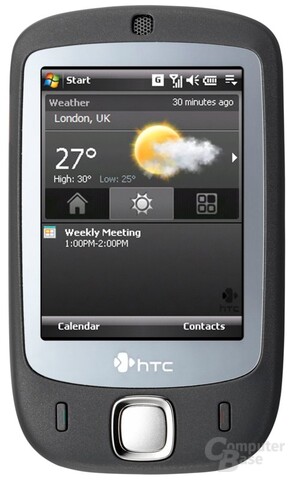
Im Gegensatz zu bislang erhältlichen Smartphones kann das HTC Touch zwischen Berührungen mit dem Finger und dem Stylus-Eingabestift unterscheiden. Dies ermöglicht es dem Besitzer des Geräts, dieses auch mit simplen Gesten steuern zu können. So kann eine bestimmte Geste des Fingers mit einer bestimmten Funktion – zum Beispiel dem Aufruf des Kalenders oder dem Schließen einer Applikation – verbunden werden. Darüber hinaus lassen sich die eigens für den Touch kreierten Menüs mit solchen Gesten durchsteuern. Erste Tests des Geräts zeigen, dass das neue Steuerungskonzept auch ganz gut funktioniert, jedoch aber noch einige Kinderkrankheiten hat.
Als Betriebssystem kommt eine spezielle Version von Microsofts Windows Mobile 6.0 Professional zum Einsatz. Das Touchscreen selbst ist 2,8 Zoll groß und liefert bei einer Auflösung von 240 x 320 Pixel bis zu 65.536 Farben. Alle weiteren Details zu den technischen Leistungsdaten des HTC Touch gibt es in der dazugehörigen Vorstellungs-News.
Via : ComputerBase
Tuesday, June 19, 2007
HTC Touch™ Delivers New Touch Screen Experience
HTC Device Signals New Direction In Finger Touch Navigation
LONDON - June 5, 2007 - HTC Corp. (TAIEX:2498; "HTC"), the world's leading provider of Microsoft® Windows Mobile®-based smart devices, today announced the global launch of the HTC Touch™, a deceptively small and stylish mobile phone that ushers in an innovative new concept in intuitive touch screen navigation. The HTC Touch™ brings a new level of simplicity to the powerful and function-rich device experience that today's mobile consumers demand.
Building on its rich ten year history of mobile phone innovations, the HTC Touch™ represents extensive research and development and the conviction that fingertip control will enable more efficient, natural and intuitive touch screen navigation. The groundbreaking HTC Touch™ offers a new and unique way of controlling touch screen-based devices by recognising and responding to the sweep of a finger across the screen. It is even intelligent enough to distinguish between finger and stylus input and then respond accordingly.
"With the HTC Touch™, access to your most commonly used content, contacts and features is only a simple finger flick away," said Peter Chou, chief executive officer of HTC. "Mobile phone makers have done a great job of cramming ever-more exciting features into ever-smaller phones. But the way in which one accesses these increasingly sophisticated features has not kept pace. That ends today with the HTC Touch."
Smart, stylish and versatile, the HTC Touch™ brings together a wide variety of communication, entertainment and professional capabilities that enable mobile consumers to balance work and play. The new HTC-designed homescreen provides one-touch access to emails, text messages, calendar appointments and contacts, as well as current weather conditions and forecasts for hundreds of cities around the world.
The HTC Touch is the first device to feature TouchFLO™, the new underlying touch screen technology developed by HTC. Consumers simply sweep their finger up the display to launch an animated, three-dimensional interface comprising three screens: Contacts, Media and Applications. The interface can be spun by swiping a finger right or left across the display, providing efficient access to the features consumers use most. TouchFLO™ also enhances finger touch scrolling and browsing of Web pages, documents, messages and contact lists.
Leveraging the broad functionality of Windows Mobile® 6 Professional, the HTC Touch™ includes Outlook Mobile, Office Mobile, Windows Live™ and the capabilities to run thousands of third-party applications. Users can surf the web with Internet Explorer®, send and receive emails, chat on Messenger and send files to their own web space through Windows Live™. Other HTC Touch™ details include:
- Dimensions: 99.9mm (L) x 58mm (W) x 13.9mm (T)
- Weight: 112g with battery
- 1GB microSD storage card included / 64MB RAM, 128MB ROM
- 2.8" LCD touch screen with backlight, 240 x 320 dots resolution with 65,536 colours
- Battery Life: Rechargeable Li-Ion battery with a capacity of 1100 mAh
- Standby time: Up to 200 / Talk time: Up to 5 hours
- Camera: 2.0 mega-pixel CMOS colour camera
- Windows Mobile 6® Professional with Direct Push Email and HTML email support
- Wireless Connectivity: GSM/GPRS/EDGE Tri-band: 900, 1800,1900, Wi-Fi®: IEEE 802.11 b/g and Bluetooth® 2.0
- Choice of two colors at launch - elegant soft black or alluring wasabi green
The HTC Touch™ is now available in the United Kingdom and will be released later this month in Asia and throughout Europe. The North and Latin American version of the HTC Touch™ will be available in the second half of 2007.
Via : HTC
Monday, June 18, 2007
Saturday, June 16, 2007
HTC TOUCH TAKES ON THE IPHONE
HTC’s Touch is a brand new smartphone design with a very cool touch-screen navigation system – similar to what Apple has reportedly developed for their soon-to-be-unleashed iPhone.
But one of the big differences here is that HTC’s device is built on – and has improved upon – a sixth-generation operation system. The iPhone will be Apple’s first-generation in-house designed smartphone.
HTC, the manufacturer behind some of the best smartphones on the market today (like the terrific T Mobile Dash), has been working on their revolutionary touch screen device for two years – and the pedigree is reflected in the Touch.
HTC based their phone on Microsoft’s just-released Windows Mobile 6 OS. They developed a number of improvements to the standard (boring-but-functional) WM smartphone home screen by, among other things, adding a big digital clock or local weather display as the main focal point. The new screen is not only beautiful it’s also user-friendly.
(MSNBC.com is a Microsoft-NBC Universal joint venture.)
Touch and slide
Touch’s hottest feature is their next-generation touch screen and the software which controls it. HTC calls their underlying technology TouchFLO. It’s a new way of controlling your phone by recognizing and responding to the sweep of your finger across the screen. The system is even smart enough to know the difference between your finger and stylus input. I find that the phone’s touch screen is actually a little less rigid/more compliant than other smartphones I’ve tried.
All you need to do is slide your finger up the display to launch the animated interface. You are then greeted by Touch’s new 3D screens: ‘Contacts’, ‘Media’ and ‘Applications’. The interface is spun by swiping your finger right or left across the screen. You can also use your finger to open and close menus, move from one screen to another, easily scroll up and down through contact lists and actually move documents and Web pages.
Does it work? You bet! It takes a minute or two to get used to the system and perfect your screen sliding skills. Once you do, it begins to be second nature.
The rest of the device ain’t bad either. It’s very small: 3.9 by 2.3 by 0.55 inches and weighs a hair less than 4 ounces with the battery. The 2.8-inch backlit touch screen is capable of reproducing 64K colors. The 1100mAh Lithium-ion battery is said to provide up to 5 hours of talk time and 200 hours of standby.
My Touch sample came with 64MB of RAM and a 1GB microSD memory card to store – among other things - your music and photo files. There’s also a 2.0 megapixel camera on the back which uses the entire color screen as its viewfinder. Very cool. My sample is black but I’m told there is also a “wasabi green” model.
Touch has Wi-Fi (802.11b/g) and Bluetooth (2.0) built inside. My test sample was a GSM/GPRS/EDGE world phone – but the HTC people said they can also make CDMA models to work on North American (Verizon, Sprint) networks.
The on-screen, software keyboard is not as usable as the hardware keyboard on other smartphones. Using the included stylus is an absolute necessity. The iPhone has a software keyboard too. Personally, I do more e-mail reading than sending. But, I’m hoping someone comes up with a much better method in the near future.
HTC has begun rolling out the GSM version in the United Kingdom and will release the Touch, later this month, in Asia and other European countries. North and Latin American versions are expected later this year. I’ve been told “early fourth quarter” is most likely for the United States. U.S. pricing has not been announced.
My first impression: this is one small, lightweight, feature-laden, action-packed, next-generation smartphone. How does it compare to the iPhone? We’ll know more soon.
GARY KRAKOW
Via : MSNBC
Friday, June 15, 2007
HTC Touch Specification
 Processor : TI's OMAP™ 850, 201 MHz
Operating System :Windows Mobile® 6 Professional
Memory : ROM: 128 MB / SDRAM: 64 MB DDR
Dimension : 99.9mm (L) X 58mm (W) X 13.9mm (T)
Weight : 112g with battery
Display : 2.8" LCD touch screen with backlight 240 X 320 dots resolution with 65,536 colors
Network : GSM/GPRS/EDGE Tri-band: 900, 1800, 1900 (The device will operate on frequencies available from the cellular network.)
Device Control : HTC TouchFLO™ / 5-Way navigation control
Connectivity : Bluetooth® 2.0 + Wi-Fi® IEEE 802.11 b/g + HTC ExtUSB™ (11-pin mini-USB and audio jack in one)
Camera: 2.0 megapixel CMOS color camera
Audio : Built-in microphone and 3-in-1 speaker
Windows Media Player supported formats: AAC, AAC+, eAAC+, MP3, WMA, WAV, QCELP,
MPEG4, AMR-NB, AMR-WB
Battery :Rechargeable Li-lon battery
Capacity: 1100 mAh
Standby time: Up to 200 hours
Talk time: Up to 5 hours
Expansion Slot : microSD™ memory card (SD 2.0 compatible)
AC Adapter : Voltage range/frequency: 100 ~ 240V AC, 50/60Hz / DC output: 5V and 1A
HTC Touch Un téléphone Windows Mobile 6 qui devient enfin grand public

Windows Mobile simplifié
Le Touch innove ici en proposant en plus d'un système de navigation tactile, une navigation faussement 3D composée de grosses icônes élégantes et surtout évidentes pour qui cherche à effectuer toutes les opérations que ce téléphone propose. D'un coup de doigt – du bas vers le haut – vous basculez de l'interface classique de Windows Mobile vers cette interface inédite et ludique. D'un coup de doigt – vers la droite ou vers la gauche – vous faites défiler les écrans à l'instar de l'effet « cube » de Mac OS X. D'un clic de doigt vous sélectionnez l'une des multiples options proposées pour atterrir au cœur de Windows Mobile 6.
Un téléphone Web
Wi-Fi (802.11b/g) embarqué oblige, une grande partie de ce téléphone use et abuse d'une connexion à l'Internet pour récupérer des informations sur la météo du jour (et des quatre jours à venir) ou vous connecter aux services de Windows Live à commencer par l'incontournable Windows Live Messenger (ex MSN Messenger). Attention à ne pas user et abuser de ces derniers hors Internet, car si c'est votre téléphone qui est sollicité via GPRS ou EDGE, il faut impérativement disposer d'un forfait data adapté. L'Internet mobile est comme d'habitude : incompatibilité avec les portails Wap des opérateurs oblige, vous n'avez ici accès qu'à un nombre restreints de sites Internet et pas toujours adaptés à la taille de l'écran de ce téléphone. En revanche, la gestion des e-mails – par exemple un compte Hotmail – ou l'accès à Outlook Web Access (pour peu que votre responsable informatique sache le configurer) est assuré sur ce téléphone. Vous avez ainsi accès à l'ensemble de vos e-mails en « Push », c'est-à-dire en mode consultation à distance. Le Blackberry n'a qu'à bien se tenir.
Le multimédia stocké en standard
Côté multimédia, le Touch ne démérite pas. Si son capteur photo de 2 mégapixels permet de réaliser des photos plus que satisfaisantes, on regrettera qu'il ne dispose pas d'un petit flash pour compenser sa faible sensibilité. N'escomptez pas non plus shooter en rafale avec cet appareil. Même si l'option « salve » est de la partie, le mode photo n'est pas d'une vélocité redoutable. En revanche, on trouve différentes options pour appliquer des effets spéciaux, voire adapter le format de la photo à son usage comme l'envoi d'un MMS ou la création d'une photo pour la gestion des contacts. Livré avec une carte mémoire d'un giga au forma micro SD, on a aucun soucis pour synchroniser – depuis un PC sous Vista avec Windows Media Player 11 – une partie de sa bibliothèque musicale. Restent quelques petits soucis que nous avons rencontrés lors de nos tests tels l'incapacité de gérer les DRM 10 avec cet appareil.
Des petites options repensées
Là où Windows Mobile 6 séduit c'est sur la multiplicité de petits détails qui ont été repensés. Ainsi il est possible d'un seul clic de décharger la totalité des applications présentes en mémoire. Il est également proposé de sélectionner depuis le lecteur multimédia du HTC un fichier WMA ou MP3 pour le désigner en tant que sonnerie du téléphone. C'est là où parfois on se demande si Microsoft à bien réalisé que Windows Mobile, c'est aussi un système d'exploitation pour des téléphones. La gestion de la bibliothèque musicale a été légèrement modifiée – afin de gérer indifféremment sans se poser de questions – les fichiers présents sur la mémoire du téléphone ou sur la carte de stockage. Côté Outlook Web Access, on devrait bénéficier de petites retouches comme la gestion à distance de l'indicateur d'absence de son bureau. Mais pour bénéficier de cette ultime option, il faut pour cela que le serveur Exchange bénéficie de la toute dernière mise à jour. Là on n'est clairement pas dans une option grand public. Cela dit, reste à chacun d'apprécier ou non le caractère professionnel ou personnel de la synchronisation des données (agenda, contacts et taches à réaliser) issue de Microsoft Outlook. Fonction qui reste à bien des égards « l'application killer » de ce Windows Mobile 6 vu sa simplicité. Enfin, n'oublions pas de signaler les applications embarquées comme la suite mobile d'Office, le lecteur Adobe Reader ou encore l'outil de décompression des fichiers au format Zip.
Bons et mauvais côtés
Côté autonomie : bonne nouvelle, le Touch tient la route une journée durant. Mais vu le nombre incroyable d'activités que l'on est à même de réaliser avec ce smartphone, il est préférable d'être prudent et d'avoir son chargeur à portée de main. Restent quelques petites critiques qui n'en sont pas réellement comme la lenteur toute relative de l'appareil lorsque l'on charge trop la mule, l'absence de GPS embarqué (vu la taille de l'appareil on se demande où ils peuvent encore faire tenir une telle option) et l'absence de gestion des modes 3G et 3,5G.
